A guided shoot designed by professional property photographers
Pro property photos, shot by you.
Working property photographers have planned every room for you: where to stand, which angles to take and how to hold the phone. AgentShot Pro walks you through it shot by shot, keeps every frame level, takes three exposures at once and sends them for professional editing.
Watch a shot being taken
Lower to navel height, level up, hold still. The camera takes three exposures the moment everything is right, then sends them for editing.
Guided by people who shoot property for a living
This isn't a camera filter. It's the shoot our professional photographers would do, built into your phone: their angles, their order, their settings.
The right angles, room by room
Each room type has its own guide written by professional property photographers. Lounges and bedrooms start from the doorway looking across, then from the far corner back towards the door.
Where to stand, shown on a plan
A simple floor plan marks the spot for each angle, so you're not guessing in a small bathroom or a long hallway.
Settings a photographer would choose
Lens, exposures, focus and colour are set by professional photographers to get the best results from your phone. You just frame and hold still.
From front door to portal-ready
No tripod, no camera bag, no waiting for a photographer's diary. The person already at the property shoots it, and the app makes sure they get it right.
Set up your agency
Create your account and add your team. Everyone gets their own login for the app, and you decide who can buy listings.
Shoot room by room
The app plans the shoot from your bedroom and bathroom count and shows where to stand in each room. It checks every photo before you move on.
Get edited photos back
Every photo is professionally edited and sent to you by email on your own download page, in full size for print and web size for the portals.
Three exposures. One finished photo.
Every tap captures a darker, a middle and a brighter frame, with focus and colour locked. Editing blends them, so the window shows the view outside and the room stays bright.
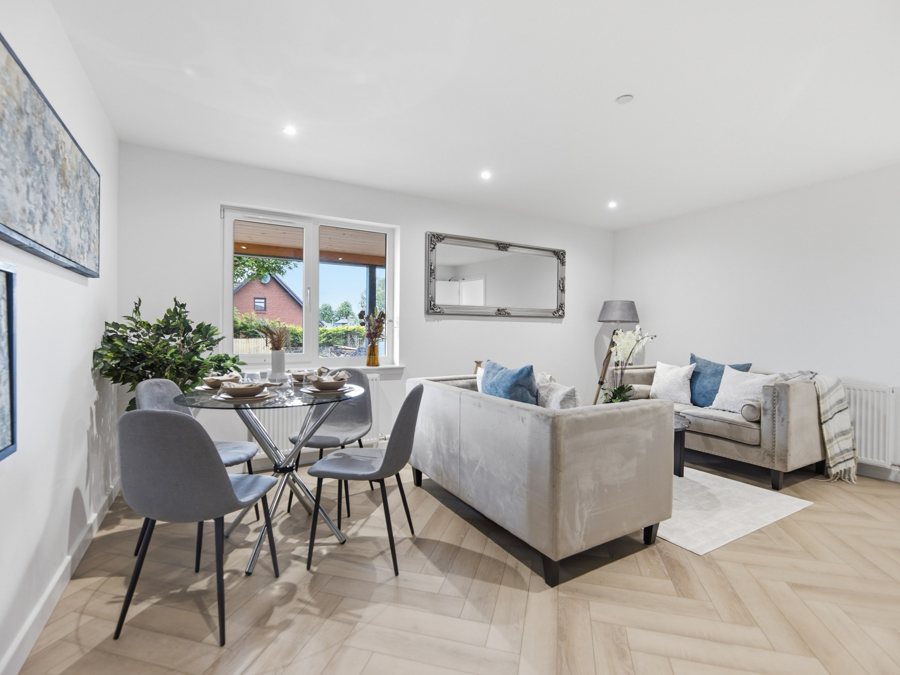
The three exposures here are simulated from the finished photo. Real before-and-after sets from AgentShot Pro shoots will replace them.
Level every time
A live level guide turns green when the phone is straight. No leaning walls, no tilted ceilings.
Navel height
The angle professionals use for rooms. On iPhone the height bar confirms it; on Android the guide shows you where to hold the phone.
Settings done for you
Camera settings are set by professional photographers to get the best results from your phone. Nothing to adjust.
A plan for every room
Shoot in any order. Each room shows where to stand for its two best angles, and exteriors fit in whenever suits you.
Nothing missed
Before you send, the app checks what you shot against the rooms you entered, so a second bedroom never goes unphotographed.
Privacy blur
Tenanted property? Tick one box and faces and number plates are blurred automatically.
Made for lettings and sales
Whether it's a flat between tenancies or a family home going on the market this week, the person already there can shoot it properly.
Letting agents
Re-let quickly without booking a photographer for every flat. Privacy blur for tenanted homes, and a login for every property manager.
For letting agentsEstate agents
Get new instructions live the day you win them, keep listings fresh, and save your photographer budget for the homes that need it most.
For estate agentsiPhone first. Android next.
AgentShot Pro needs full control of the camera, so it works on phones with an ultra-wide lens and manual exposure. The app checks your phone in a few seconds before you start.
iPhone
Launching first- iPhone 11 or newer
- Not the iPhone SE, 16e or Air (no ultra-wide lens)
- iOS 17 or later
- Height bar uses the phone's depth sensing
Android
Following soon- Recent flagship Android phones with full camera control and an ultra-wide lens
- The phone check confirms yours before you buy
- Same guided shoot, same editing, same download page
Pay per listing, or save with a monthly plan
Prices include VAT. Every listing includes up to 30 edited photos and its own download page.
One listing
£39.99
Pay as you go. Use it within 90 days. Buy another whenever you need one.
Buy a listing Or try one photo freeMonthly plans
| Listings a month | Price | Per listing |
|---|---|---|
| 5 | £190 | £38 |
| 10 | £350 | £35 |
| 15 | £480 | £32 |
| 25 | £750 | £30 |
| 30 | £840 | £28 |
Launch offer: your first month on any monthly plan comes with double the listings.
Monthly listings are used within the month. Pay by Direct Debit or card. Business customers only.
Choose a monthly planBuilt for the whole branch
One account for the agency, a login for everyone who shoots. Add or remove people in seconds, and see every listing in one place.
Questions agents ask
Do I need a tripod or any extra kit?
No. The app guides you to hold the phone level and at navel height, and only takes the photo when it's steady.
How much does a listing cost?
£39.99 for a single listing, or from £28 a listing on a monthly plan. Prices include VAT, and every listing includes up to 30 edited photos.
Can I try it for free?
Yes. Create a free account and you get one test photo: shoot one room in the app and we'll edit it and email it back, so you can judge the quality before buying a listing. One free photo per agency, no card needed.
Which phones work?
iPhone 11 or newer, apart from the iPhone SE, 16e and Air, on iOS 17 or later. Android follows soon on recent flagship phones with full camera control. The app checks your phone before you start.
Why does it need an ultra-wide lens?
Rooms are photographed wide, the way professional property photographers shoot them, so the app uses the phone's ultra-wide lens. Phones without one can't take the shot.
Why three exposures?
Each photo is taken as a darker, a middle and a brighter frame. Editing blends them, so windows show the view outside and the room stays bright, without a flash.
How do I get the photos?
By email, with a link to your listing's own download page. Download every photo in full size or web size, one at a time or all at once. The app also shows when a listing is ready.
Shoot your next listing yourself.
Start with a free test photo, or set up your agency in a few minutes. The app is coming soon to the App Store and Google Play.